
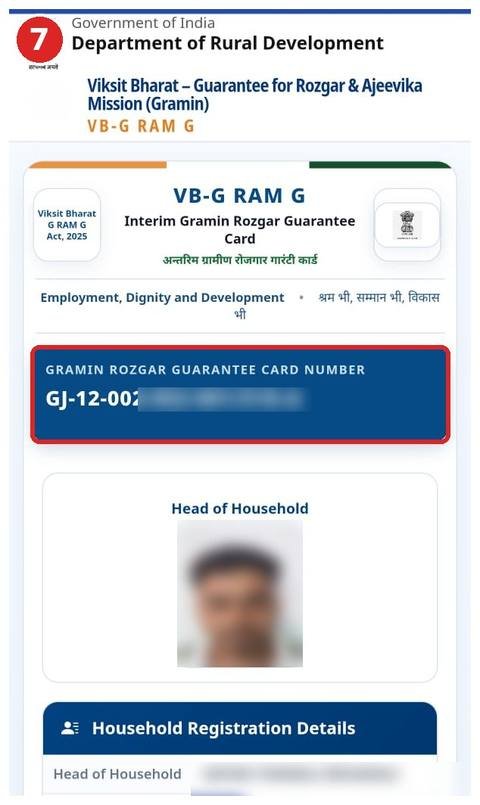
Under VB-G RAM G, the old MGNREGA job card has a new name: the Gramin Rozgar Guarantee Card (GRG card). On the portal it currently appears as the Interim Gramin Rozgar Guarantee Card, with the tagline “Employment, Dignity and Development”. Your existing job card has simply become this card – there’s nothing new to apply for.
Job card vs Gramin Rozgar Guarantee Card
| Old (MGNREGA) | New (VB-G RAM G) | |
|---|---|---|
| Name | Job card | Gramin Rozgar Guarantee Card |
| Work guarantee | 100 days | 125 days |
| Number | Job card number | Gramin Rozgar Guarantee Card Number (same structure) |
| Identity | – | E-KYC Done and ABPS Enabled shown for each member |
How to read the card number
It looks like this: XX-00-000-000-000/000
- XX – state code (e.g. UP, BH, RJ, GJ)
- Then the district – block – panchayat – village codes
- After the / – your household’s serial number (sometimes with a letter such as A or B)
How to view your card online
- vbgramg.dord.gov.in → Dashboard → MIS Report → solve the captcha.
- Pick the financial year and state, then R1. Beneficiary Detail → Category wise Household/Workers.
- Tap your district, block and panchayat and open the Job Card/Employment Register.
- Tap the card number next to your name to open your Interim Gramin Rozgar Guarantee Card.
Screenshots of every step: job card list guide.
What’s on the card
- The Gramin Rozgar Guarantee Card number
- A photo of the head of household
- Household Registration Details – head of household, father’s/husband’s name, category, address, village, panchayat, block, district and registration date
- A members table – name, gender, age, and E-KYC Done and ABPS Enabled for each member
- A financial year selector showing work and days in that year
What “E-KYC Done” and “ABPS Enabled” mean
E-KYC Done: the worker’s identity has been verified against Aadhaar (by face photo in the NMMS app). See the eKYC guide.
ABPS Enabled: ABPS is the Aadhaar Based Payment System. “Yes” means wages can go straight to the Aadhaar-linked bank account. If it says “No”, ask your bank to seed your Aadhaar and complete NPCI mapping – otherwise payments can get stuck.
Colours in the register
- Green – photo uploaded and employment provided
- Gray – photo uploaded, no employment yet
- SunFlower – no photo, but employment provided
- * next to a name – deleted. If that’s you, see this guide.
Screenshots
FAQ
Do I need to apply for a Gramin Rozgar Guarantee Card?
No. Existing MGNREGA job cards have been converted automatically. New households can use the application form.
Has my job card number changed?
The number keeps the same structure (state-district-block-panchayat-village/serial). Find your number here.
ABPS Enabled says “No” – what do I do?
Fill in the Aadhaar seeding and NPCI mapping form at your bank branch, then keep an eye on your payment status.
Written by NREGA Job Card, an independent website, from the official portal.