
The job card list – officially the Job Card/Employment Register – is published for every Gram Panchayat. It shows each registered household, its job card number, and whether work has been provided. Since 1 July 2026 the list sits on the VB-G RAM G portal, vbgramg.dord.gov.in, which replaced the old nrega.nic.in site.
Find your name in five steps
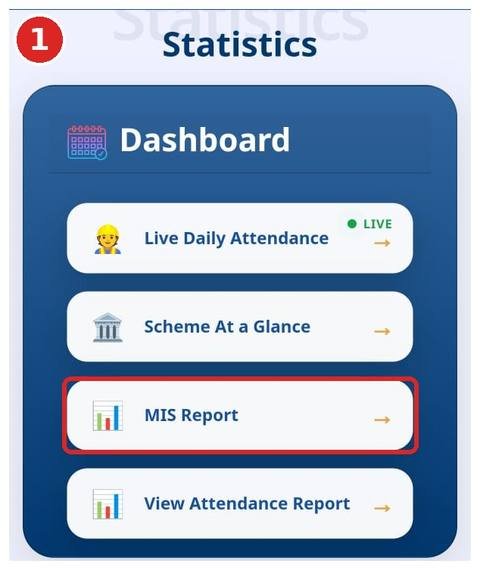
- Open vbgramg.dord.gov.in and, in the Dashboard section, tap MIS Report. The reports site, vbgramgrep.dord.gov.in, opens.
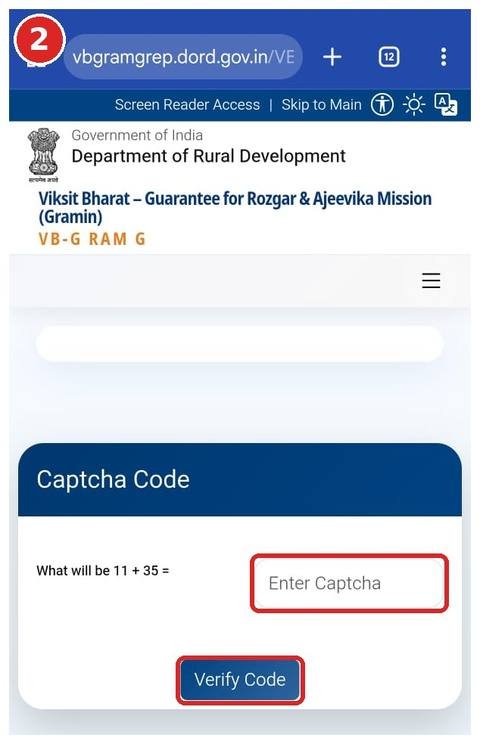
- Solve the small sum in the Captcha Code box (for example 11 + 35 = 46) and tap Verify Code.
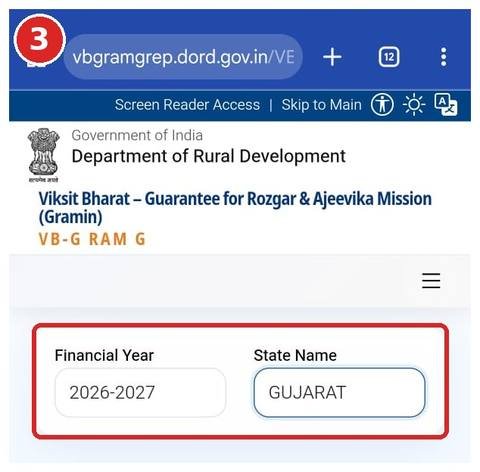
- Choose Financial Year 2026-2027 and, under State Name, your state.
- In the report list, open R1. Beneficiary Detail → “1. Job Card Related Reports” → Category wise Household/Workers.
- In the district table, tap your district name, then your block, then your Gram Panchayat.
- The Job Card/Employment Register opens, listing every household’s Gramin Rozgar Guarantee Card No. and name. Search for your name with Find in page or Ctrl + F.
- Tap your card number to open the full card – photo, household members, E-KYC and ABPS status, and work and wages for the Financial Year you pick at the bottom.
The path at a glance
1Dashboard → 2MIS Report → 3Captcha → 4Year + state → 5R1 → Category wise Household/Workers → 6District → 7Block → 8Panchayat → 9Job Card/Employment Register
The portal layout changes from time to time – go by the button labels.
Screenshots of every step
These screenshots were taken on a phone in October 2026 (Gujarat shown as the example). Names, photos and card numbers have been blurred.
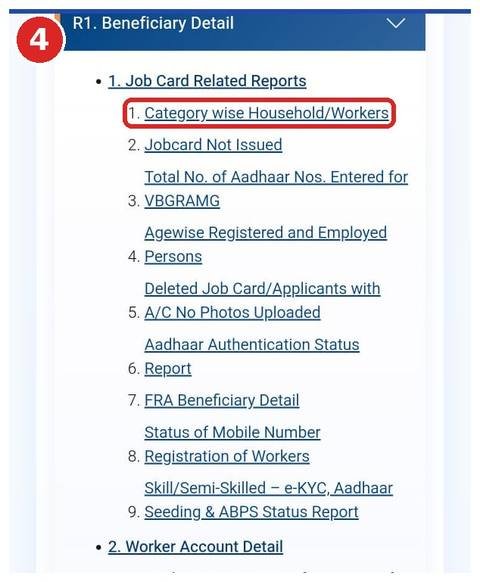
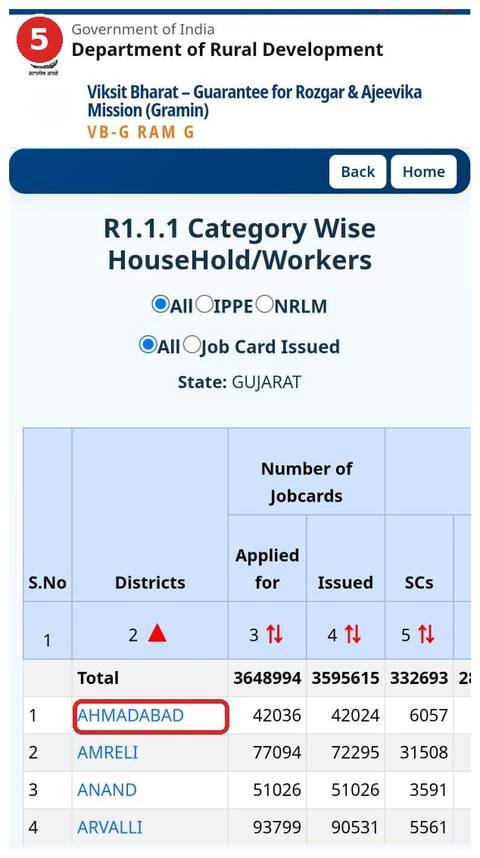
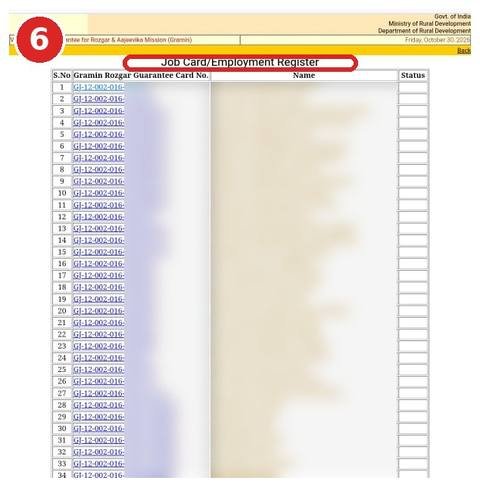
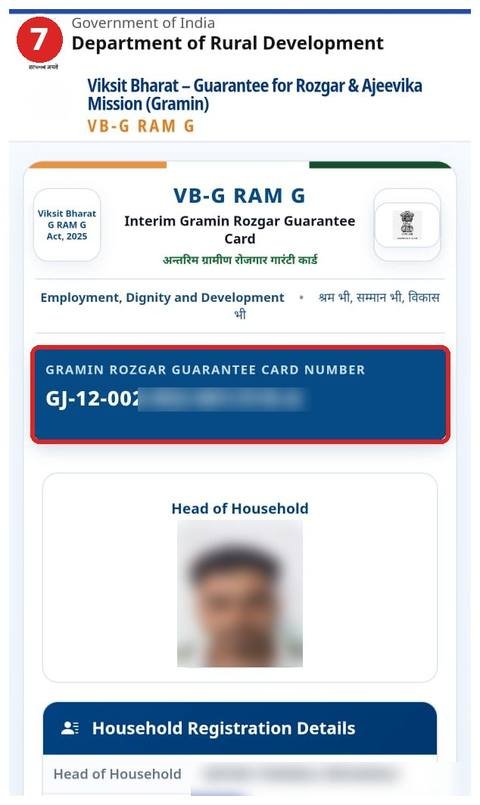
The portal’s design changes from time to time. If a button looks different, go by its label rather than its position.
Official links
- VB-G RAM G official portal ↗ Main government website of the scheme (formerly nrega.nic.in).
- State reports / Job card list ↗ Pick state → district → block → panchayat to see job cards, muster rolls and payments.
- Wage rate notification (Gazette PDF) ↗ S.O. 3518(E), 30-06-2026
These are government websites; we are not affiliated with them. Government services are free; do not pay anyone.
What the colours in the list mean
- Green – photo uploaded and work provided
- Grey – photo uploaded, no work yet
- Yellow (SunFlower) – work provided, photo missing
- Red – no photo and no work
- An asterisk (*) – the job card has been deleted
Older lists (2023-24, 2024-25, 2025-26)
The register keeps a household’s full history, so you rarely need a separate list for each year. If you want to see work or payments from an earlier year, choose the Financial Year on the report screen when the option is offered. Inside an individual job card, work and wages are shown year by year.
Name not there?
The usual reasons are a spelling difference, the card being registered under the head of household’s name, or the card having been deleted. Our guide Name missing from the job card list walks through each case.
FAQ
Do I need to log in to see the list?
No. The job card register is a public report – no username or password is needed.
Can I download the list as a PDF?
Use your browser’s Print option and choose “Save as PDF”. See Job card download.